
25 things to know before you play GTA 6
Before your first drive, set the subtitles where you can read them and choose how you want the GPS to call out turns. Once you have the keys, try three things while parked: tap D-pad Left to signal, double-tap it to silence the radio, then hold it to find the window switch. The same button does all three on PS5 and Xbox.
On this page
Settings and saves for your first session
- Set up the GPS before taking the minimap off. Pick a destination, leave turn-by-turn directions on and try the voice or chime on a short trip. The compass can keep shops and objectives in sight when the corner map is hidden.
- Check your layout before learning the buttons. Pause, open Settings, then Control Scheme and choose Preview. The shortcuts here use Default. If a button looks wrong, choose the activity you are doing, such as On Foot or Vehicles, to see its assignment.
- Keep a save from the start of free roam. When you can roam and the Save Game option is available, pause, open Game and save in an empty slot. Pick a different slot after your next mission so you can still return to that first afternoon.
- Take spending money out with you. At the safehouse, check your pocket cash before heading to a shop. Money in the house stash can stay there while your character stands at the counter with an empty wallet.
Signals, lights and getting out of the car
- Signal before a turn. Tap the D-pad toward the turn. Some drivers make room when you signal. Check the traffic beside you before changing lanes.
- Leave the engine running. Stop completely, then double-tap Triangle on PS5 or Y on Xbox as you get out. Try it outside the house where you can hear the engine idle. The same double-tap in a moving car makes you bail out.
- Duck behind the dashboard. Hold Circle on PS5 or B on Xbox while seated in a car. Your character lowers their head. During a wanted search, keep an eye on the stars to see whether the search is still active.
- Choose your headlight beam. Push Square shows Circle cycling the beams on PS5. To choose a specific setting on either console, open Vehicle and select Headlights. Face a wall at night and watch the beam move as you cycle the tile.
- Feel for the throttle stop on PS5. With adaptive triggers enabled, ease into R2 until you feel resistance. That gives you a comfortable cruising pace. Squeeze farther to accelerate and ease off to match slower traffic.
Roll down a window, open the trunk or lower a convertible roof
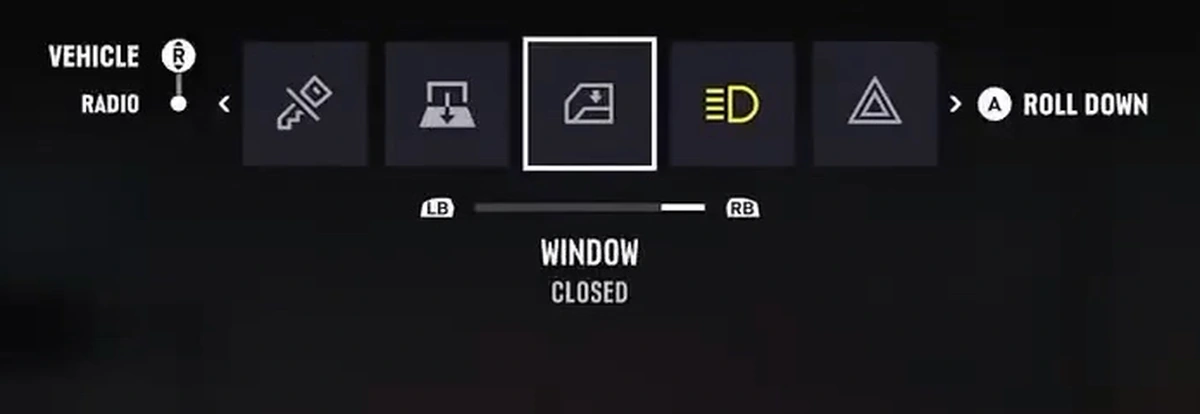
- Find the right row. Hold D-pad Left and tilt the right stick up from Radio to Vehicle. Use L1/R1 on PS5 or LB/RB on Xbox to highlight Window, then press Cross or A. Watch the glass as you use the command a second time.
- Check the vehicle you are in. A pickup can have a tailgate, a convertible can have a roof switch and a boat can have an anchor. On a boat with Anchor in the menu, lower it before leaving the deck for a swim.
One button for the indicator, radio and vehicle menu
PlayStation 5
Xbox Series X|S
- Signal leftTap oncePS5D-pad ←XboxD-pad ←
- Toggle the radioTap twicePS5D-pad ←XboxD-pad ←
- Open the radio and vehicle menuHoldPS5D-pad ←XboxD-pad ←
- Choose the Vehicle rowWhile holding Left, tilt upPS5Right stickXboxRight stick
The driver opens the menu in a yellow pickup, switches from station logos to the car controls, then selects Window. Watch the prompt change as the glass moves.
Gameplay by Games & Apps Tutorials on YouTube
Read a sign, find a seat or talk to someone
- Read the small print. On foot, put the weapon away and stand still. Hold L2 or LT and click the right stick. Pan across the sign and use R2 or RT for a closer look. Release the left trigger when you want to walk again.
- Try the end of a pier. Hold Circle or B on foot beside the edge and your character can sit with their legs over the water. Try the same hold against a railing for a lean. The pose depends on where you stand.
- Talk through the car window. Look toward someone and hold D-pad Up while seated to see the conversation choices. On foot, use L2 or LT with empty hands. For a yell from the car, click the right stick.
- Watch the right bumper. With empty hands, R1 or RB makes a rude gesture in the car. For the on-foot gesture, face the person, hold L2 or LT and press R1 or RB. With a weapon equipped that bumper has a different job.
Find a doorway or visit a Snapmatic post
- Look around the darker blue buildings. Zoom in on the in-game map. Players have found accessible spaces at darker footprints, including garages. If the front door stays shut, walk around the building and look for an open bay before moving on. A dark footprint can cover more rooms than you can enter.
- Set a route from a post. Open the phone, select Snapmatic and visit Explore, the eye tab. Open a post’s Options with Square or X. If Set Destination appears, select it and follow the GPS. Some posts have no location attached.
- Bring the current objective back. Tap D-pad Down during play to show the HUD and objective. If you still need directions, open the map and use D-pad Right for the Index. The Index groups entries by activity, so you can pick a story objective without guessing which icon starts it.
Ride in the back or take two cars
- Choose a rear door. Once your partner is driving a four-door car, stand beside a rear door and hold Triangle or Y. You can climb straight into the back from that side.
- Give your partner two commands. With both characters together in free roam, face the first car, hold D-pad Right and choose You Drive. Get behind the wheel of a second car, open the partner menu again and choose Follow Me. Check your mirror as you pull away.
Buttons that change during a fight
- Start a grapple with empty hands. On Default, hold L2 or LT to face the other character at close range, then hold R2 or RT to grab. Hold Cross or A to block instead. You can see both controls on the Melee page in Preview.
- Check the door before you hit Square or X. At the wheel this button swings the car door. On a motorcycle it kicks to the side. On foot it is the Default melee attack.
- Switch shoulders or zoom. While aiming, tap D-pad Left to move the camera to the other shoulder. Click the right stick for aim zoom or the fitted sight. On a supported scope, use D-pad Up or Down to change magnification.
- Find Quick Swap and Quick Throw. While aiming, Triangle or Y selects Quick Swap Weapon. Hold R1 or RB for Quick Throw with a throwable equipped. Look at the Aiming panel in Control Scheme before trying the bumper in a mission.
- Keep the gold-icon variant. Pick it up and watch for the unique-weapon unlock notice. If you swap it out later, visit a weapon locker and look under the base weapon for the variant. Ordinary dropped weapons have different recovery rules.
Sources
- Rich-Arm-104 · player tips and follow-up questions on r/PS5
- GTABase · Default controller screens for PS5 and Xbox
- GTA6DATA · in-game Help screens for social interaction, the radio and vehicle functions
- Morgan Park, PC Gamer · radio shortcuts, navigation, earbuds and rest poses
- Sammy Barker, Push Square · vehicle controls, passenger seats and partner commands
- Rockstar Games · GTA VI accessibility and controller settings
- Morgan Park, PC Gamer · driving at the first DualSense trigger stop
- GameSight · first-boot settings and the house in recorded PS5 gameplay
- Tom’s Guide · a first shopping trip without enough pocket cash
- Push Square · stationary first-person camera and zoom demonstration
- Zack Zwiezen, Kotaku · seated and leaning poses in free roam
- r/GTA6 · players checking dark building outlines, garages and covered spaces
- Insider Gaming · Snapmatic Explore and Set Destination in game
- dbootywarrior, r/GTA6 · two-vehicle Follow Me demonstration
- All Things How · photographs of the Melee and Vehicle Melee screens
- How to Video Game · the Aiming control diagram and shoulder switch
- How to Video Game · gold-icon variant unlock and locker recovery prompts
- GamesRadar+ · retrieving owned weapons at the locker
- All Things How · selecting Anchor in the boat’s Vehicle menu
- Games & Apps Tutorials · rolling down the truck window, 0:06–0:35