
GTA 6 launch updates and version numbers
The November 16 GTA VI game update was reported as version 1.002.001 on PS5 and 1.0.2.1 on Xbox. Sony also required a separate PS5 system update for launch. The message on your console tells you whether to update the game or the system.
On this page
Reported launch-week updates
These launch-week builds show how the download size changed on each console. A fresh installation can include the earlier updates.
| Date in 2026 | Update | Reported download |
|---|---|---|
| November 13 | GTA VI on PS5, 01.002.000 | About 1 GB |
| November 16 | GTA VI on PS5, 1.002.001 | About 603 MB, with regional variation |
| November 16 | GTA VI on Xbox, 1.0.2.1 | About 1.59 GB |
| November 17 | PS5 system software, 26.07-14.23.00 | Just over 1.2 GB |
Check the PS5 game update
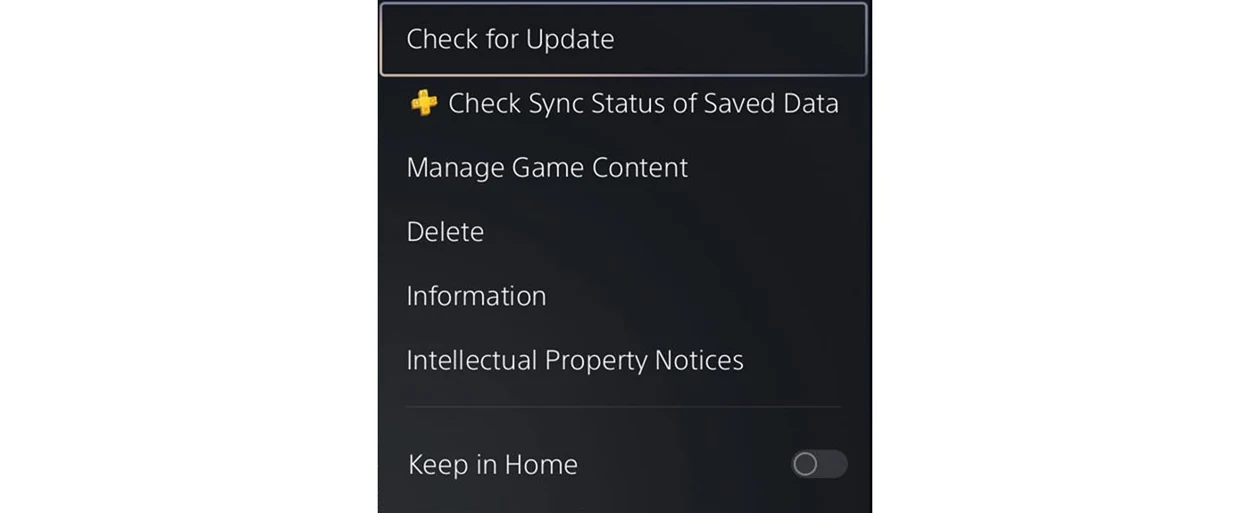
- Open the highlighted game’s menuPressPS5Options
- Choose Check for UpdatePressPS5Cross
Install the right update on PS5
For a game update, highlight GTA VI on the home screen, press Options, then select Check for Update. For a system update, open Settings, System and System Software. Select System Software Update and Settings, then Update System Software. To see which firmware you have, use Console Information under System Software.
Check an Xbox update
Open My games & apps, See all, Manage, then Updates. Select GTA VI if the console offers an update. The Xbox version number uses a different format from the PS5 version, so compare it with the Xbox entry. A console downloading the game for the first time can show a different transfer size from one that has the previous build.
Which fixes have been confirmed
As of November 21, Rockstar hadn’t published an itemized list of fixes for these builds. If an error returns after updating, record the version number and the steps that trigger it.