
GTA 6 manual for PS5 and Xbox
Press Options on PS5 or Menu on Xbox Series X|S, then open Help. Start with Basics for the HUD, phone and map. For the buttons on your own controller, open Settings and select Control Scheme.
On this page
Find a topic in the in-game manual
Pause and open Help. On PS5, switch tabs with L1 and R1. On Xbox, use LB and RB. Select an entry to read its explanation. If a topic is locked in your save, return after you reach that activity in the story.
Buttons to keep handy
These are the Default controls. Check Settings, then Control Scheme, after switching to Classic, Left-Handed or a custom console mapping. A tap and a hold can do different things on the same button.
| Action | PS5 | Xbox Series X|S |
|---|---|---|
| Pause and open Help | Press Options | Press Menu |
| Open the map | Press the touchpad | Press View |
| Show the current objective | Tap D-pad Down | Tap D-pad Down |
| Open quick navigation | Hold D-pad Down | Hold D-pad Down |
| Open the partner menu | Hold D-pad Right | Hold D-pad Right |
| Switch character once unlocked | Hold D-pad Right and press R1 | Hold D-pad Right and press RB |
| Open the loadout | Hold L1 | Hold LB |
Find the next mission
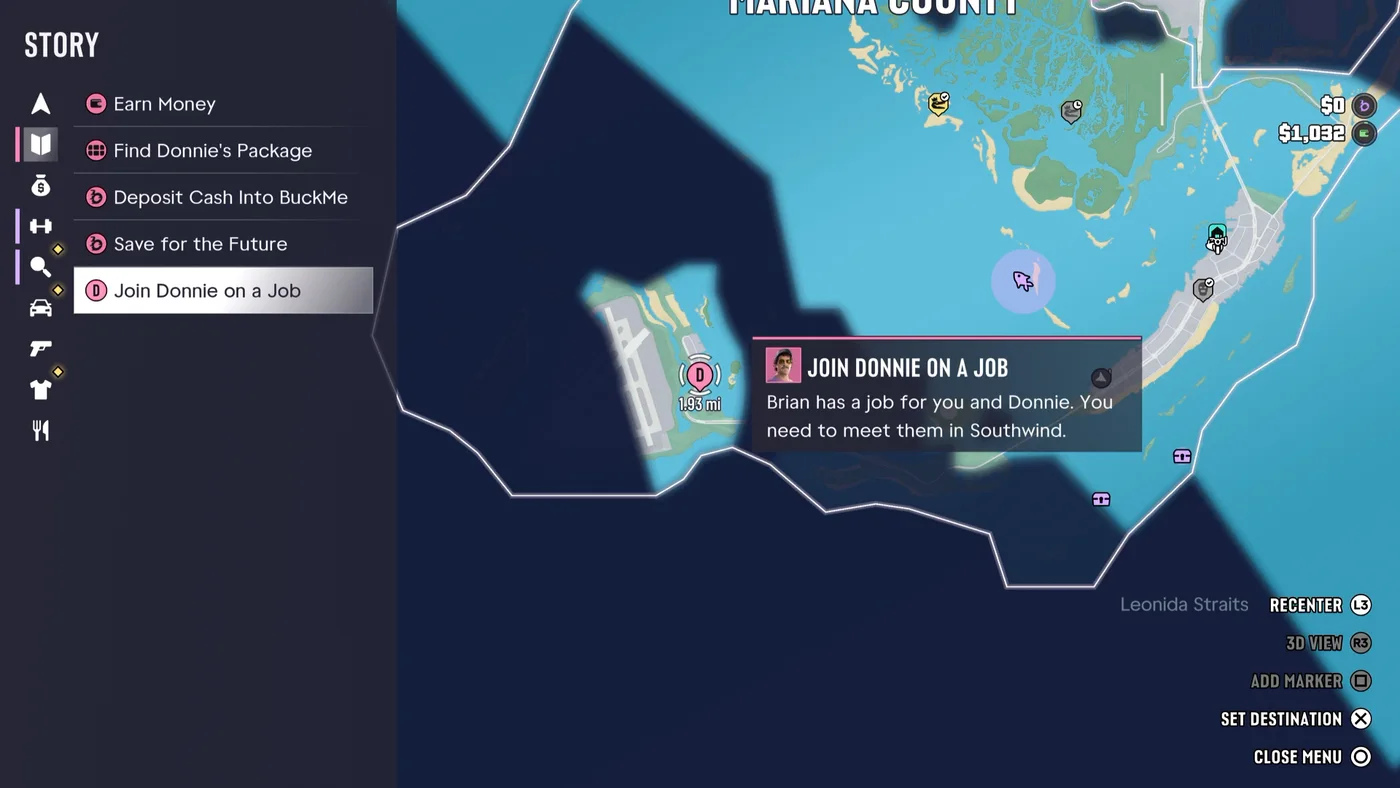
Tap D-pad Down to bring the current objective back on screen. If you need a destination, open the map, press D-pad Right for the Index and select Story. Highlight the mission and press Cross on PS5 or A on Xbox to set the route.
Save your place or change a setting
To make a separate save in free roam, pause, open Game and choose Save Game. Use an empty slot if you want to keep an earlier point in the story. On Load Game, compare the timestamp beside the autosave with your manual slots before choosing one.
If dialogue is hard to follow, open Settings, then UI for subtitles and captions. Open Audio for volume. Controller sensitivity and deadzones are under Settings, then Controller.
Sources
- Rockstar Games · Settings and control schemes
- Leonida Notebook · Xbox Help menu capture
- GTA6DATA · Recorded PS5 Help and Settings tabs
- GTABase · Default PS5 and Xbox controls
- GamesRadar+ · Map Index and mission objectives
- PC Gamer · Manual saves
- IGN · Official GTA 6 guide