
Choose characters who can quest and run dungeons together
Make characters in the same region, on the same ruleset and in the same faction. Two Alliance characters on Normal in the same region can form a party. An Alliance character on Normal and another on PvP cannot join the same dungeon group.
Choose the same ruleset
If you play in different countries, check that both WoW accounts use the same region first. Then compare the ruleset name. Normal lets you decide when to take part in open-world player combat. PvP allows opposing players to attack you across much of the world. Roleplay adds community naming and behavior rules. Roleplay PvP combines those rules with open-world player combat.
Ask whoever already plays to send three details before you create a character. A reply like “Americas, Normal, Horde” gives you everything you need to choose a compatible character. Someone who says only “PvP” may mean they enjoy battlegrounds on Normal. Have them read the ruleset name from character selection.
To check a character you already made, log out to character selection. Open the Rulesets menu and find the list with your character on it. If switching the ruleset shows a different list, switch back to find your character. Send your friend the ruleset on which your character appears.
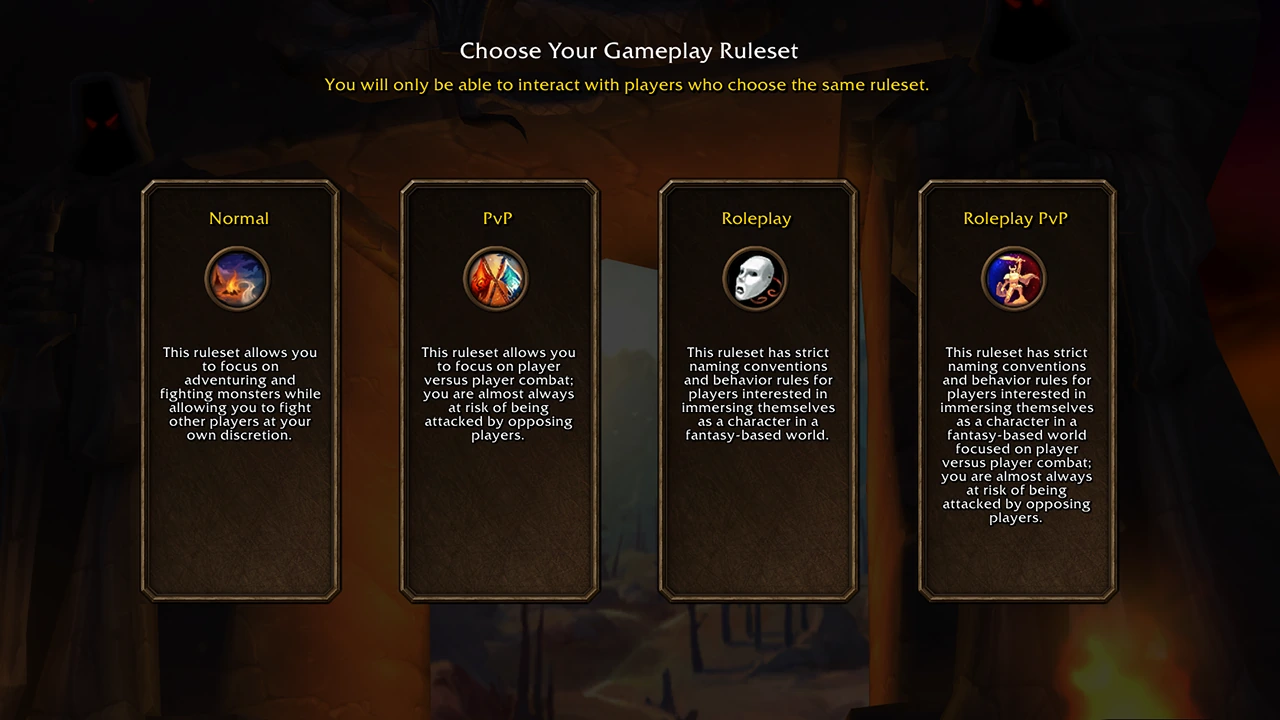
See when each ruleset allows another player to attack
Which friends can group for a dungeon?
The developers explain the faction and ruleset choices that let friends enter the same dungeon or raid.
Play clip · 29 seconds
Agree on Alliance or Horde
A ruleset can contain both factions, but Horde and Alliance characters cannot form a party together. Two Skyborne characters still need to choose the same faction at creation. On the PvP ruleset, your existing faction choice also limits which faction you can create there.
Two Skyborne can both begin on Zephras Isle and still end up on opposite sides. Confirm the faction shown for each character before finishing creation. If you would both like to play Skyborne, each account needs the Heroic Pack or higher. Choosing another available race within your friend’s faction also lets you group.
Plan where to meet
Race affects your starting area. Agreeing on a race as well as a faction can put you together from the first quest. If you choose different races, check the zone names on your maps before trying to find one another.
Trade your full two-part character names. The second name can be hidden above a character and still appears in chat. Once in the same area, pick a named quest giver as the meeting point and invite your friend to the party. Open the quest log with L and compare the title and objective so you both know which creature or item counts.
If your existing characters are on different rulesets
Create a character on your friend’s ruleset and choose the same faction. Blizzard allows some battleground matches to include several rulesets. Matching in a battleground does not give those characters a shared dungeon party.
If you can message a friend but cannot form a party, check edition, region, ruleset and faction in that order. A Normal Horde character and a Roleplay Horde character need a matching ruleset before either player travels. Keep the character you already enjoy and make a second one for the shared adventure.
If one friend plays in Europe and the other in the Americas, changing character names or rulesets alone will leave you apart. Blizzard treats WoW accounts and game time in those regions separately. Agree on the region first, then check which regional WoW license has game time before either player creates a character.
See your party when the world looks empty
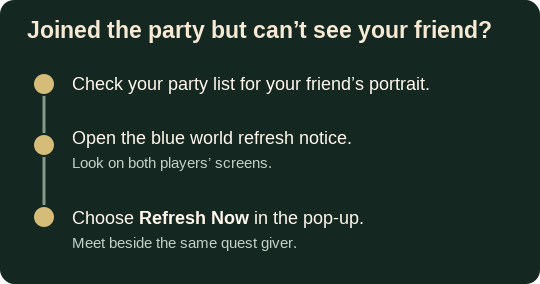
Accept the invite and look for your friend’s portrait in your party. If you’re both at the same quest giver but still cannot see each other, check for a blue world refresh message on your screen. Open it and choose Refresh Now when the button appears. Check whether your friend is now standing beside you. Both players should look for the message. Some players have reported that only one party member saw it.
If neither of you gets a refresh prompt, check the zone and the named spot again. Compare the active quest and its last completed step. Blizzard asked players who still could not see their group after a refresh to report what happened. Relogging or crossing a zone boundary produced mixed results in player reports.
Choose the language you want to hear from nearby players
Friends with different language preferences can invite each other when their region, faction and ruleset match. Preferred Online Language helps the game choose the players you see around you. To change it, press Esc, open Options and find Languages and Social under System. Set Preferred Online Language there. Text and Audio are separate choices for the language of the game itself.
To change how the game displays quests or which interface preset you use, open Options. Those choices are available after creation. For two existing characters in different rulesets, return to character selection and use a character on your friend’s ruleset.
Sources for this guide
- Blizzard · faction and ruleset boundaries
- Blizzard · first login, game versions and experience presets
- WoW Forever Outpost · ruleset comparison
- Battle.net · Games & Subscriptions account management
- Blizzard Support · playing WoW in a different region
- Blizzard and players · World Refresh while grouped
- Blizzard · language and social preferences at launch
- WoW Forever players · grouping across language preferences
- LagoFast · switching character lists from the Rulesets menu